Export NotebookLM Flashcards to Anki (.apkg & AnkiConnect)
NotebookLM can generate useful flashcards, but it does not provide a proper Anki export. Copying every question and answer by hand works for a few cards, not for a full study deck. Here are the practical ways to move the cards into Anki without losing their sources.
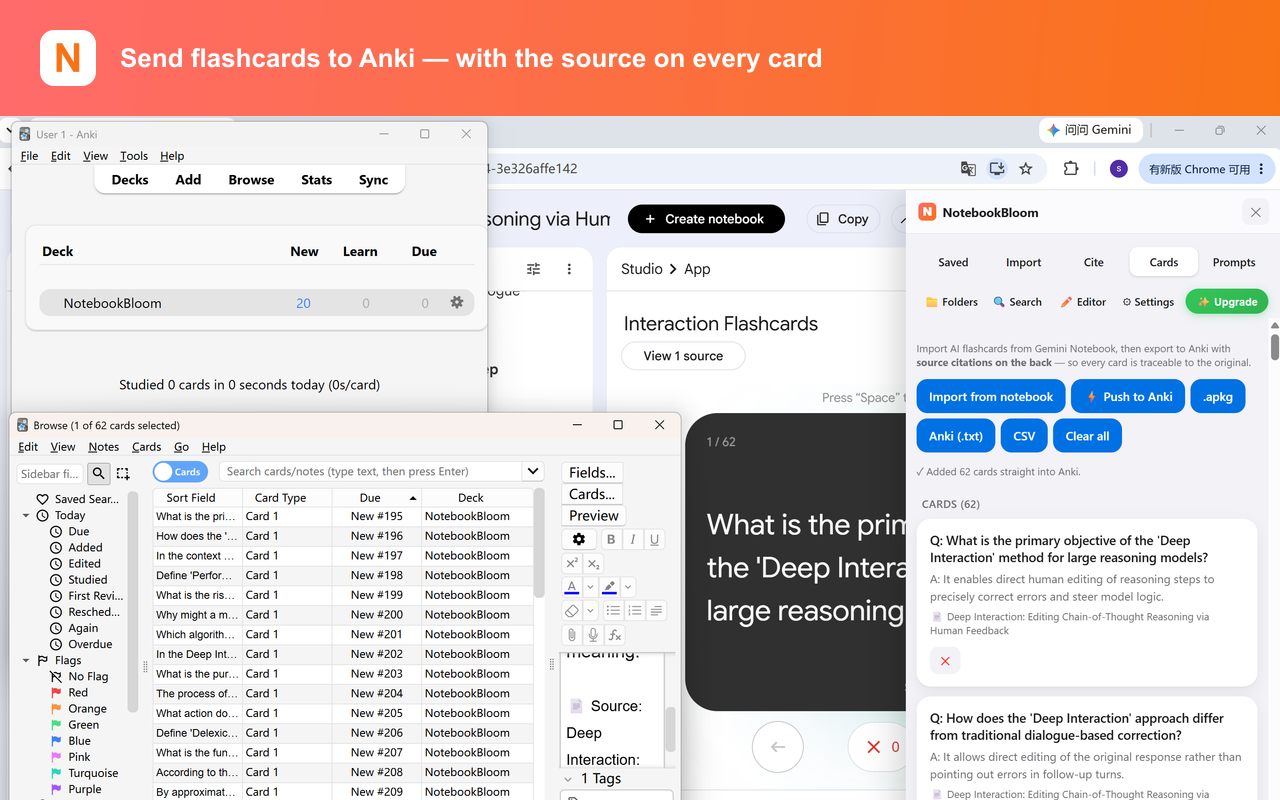
I do most of my studying in Anki. So the first thing I wanted from NotebookLM's flashcard feature was obvious: get these cards into Anki. Turns out that's the one thing it won't let you do.
NotebookLM — now Gemini Notebook after Google's July 2026 rename — will happily generate a stack of flashcards from your sources. They're decent. But there's no export button, no.apkg, no CSV, nothing. And there's a second problem that bothers me more: the cards don't tell you where the answer came from. For casual trivia that's fine. For med school or a licensing exam, a flashcard you can't trace back to a source is a flashcard you can't trust.
The manual way (tedious, but let's be honest about it)
Before I automated this, here's what the process looked like:
- Generate the cards in NotebookLM.
- Copy each question into a spreadsheet column, and the matching answer into the next column.
- Add a third column for the source — I'd manually note which document each card came from, because Anki lets you put anything on the back of a card and I wanted the source there.
- Save the sheet as tab-separated text. Anki imports TSV cleanly if you map the columns.
- In Anki: File → Import, pick the file, map column 1 → Front, column 2 → Back, column 3 → also Back (or a custom field).
A tab-separated file for three cards looks like this — Front, then a tab, then Back, then a tab, then Source:
What does the hippocampus consolidate?	Short-term memories into long-term storage	Kandel, Principles of Neural Science, ch. 65
Which vitamin deficiency causes scurvy?	Vitamin C (ascorbic acid)	Harrison's Internal Medicine, 21e
Normal resting heart rate in adults?	60–100 bpm	AHA Guidelines 2023
This works. I did it for months. But copying question/answer pairs one at a time, then hand-typing the source for each, is exactly the kind of task where you start cutting corners — and the corner people cut first is the source, which is the corner that matters most.
Why the source on the card matters
When you're reviewing 200 cards a day and one of them says something that contradicts what a professor said in lecture, you need to know which one is right — immediately. If the source is printed on the back of the card, you check it in two seconds. If it isn't, you either trust a card you can't verify or you go hunting through notebooks. Neither is good the week before an exam.
Can NotebookLM export quizzes to Anki?
Not directly. NotebookLM's quiz and flashcard tools are separate, and NotebookBloom exports the flashcards rather than quiz sessions. If the material only exists as a quiz, generate flashcards from the same sources first, then export those cards to Anki. That keeps the front, back and source fields predictable instead of trying to turn multiple-choice state into an Anki deck.
The one-click way
NotebookBloom pulls the generated cards straight out of your notebook and exports them with the source already attached. There's a small technical reason this is reliable that I'm oddly proud of: it reads the cards from NotebookLM's own data, not by scraping the visible page, so it doesn't break every time Google nudges the layout. Three ways out:
- .apkg — a ready-made Anki deck. Double-click, it imports, done.
- TSV — the tab-separated format above, if you want to tweak before importing.
- Direct push — send straight into a running Anki via AnkiConnect.
| Method | What you need | Best when |
|---|---|---|
.apkg | Anki Desktop only | You want the simplest, most reliable import |
| TSV / text | Anki Desktop and field mapping | You want to edit the cards before importing |
| AnkiConnect push | Anki open plus AnkiConnect 2055492159 | You want cards added without downloading a file |
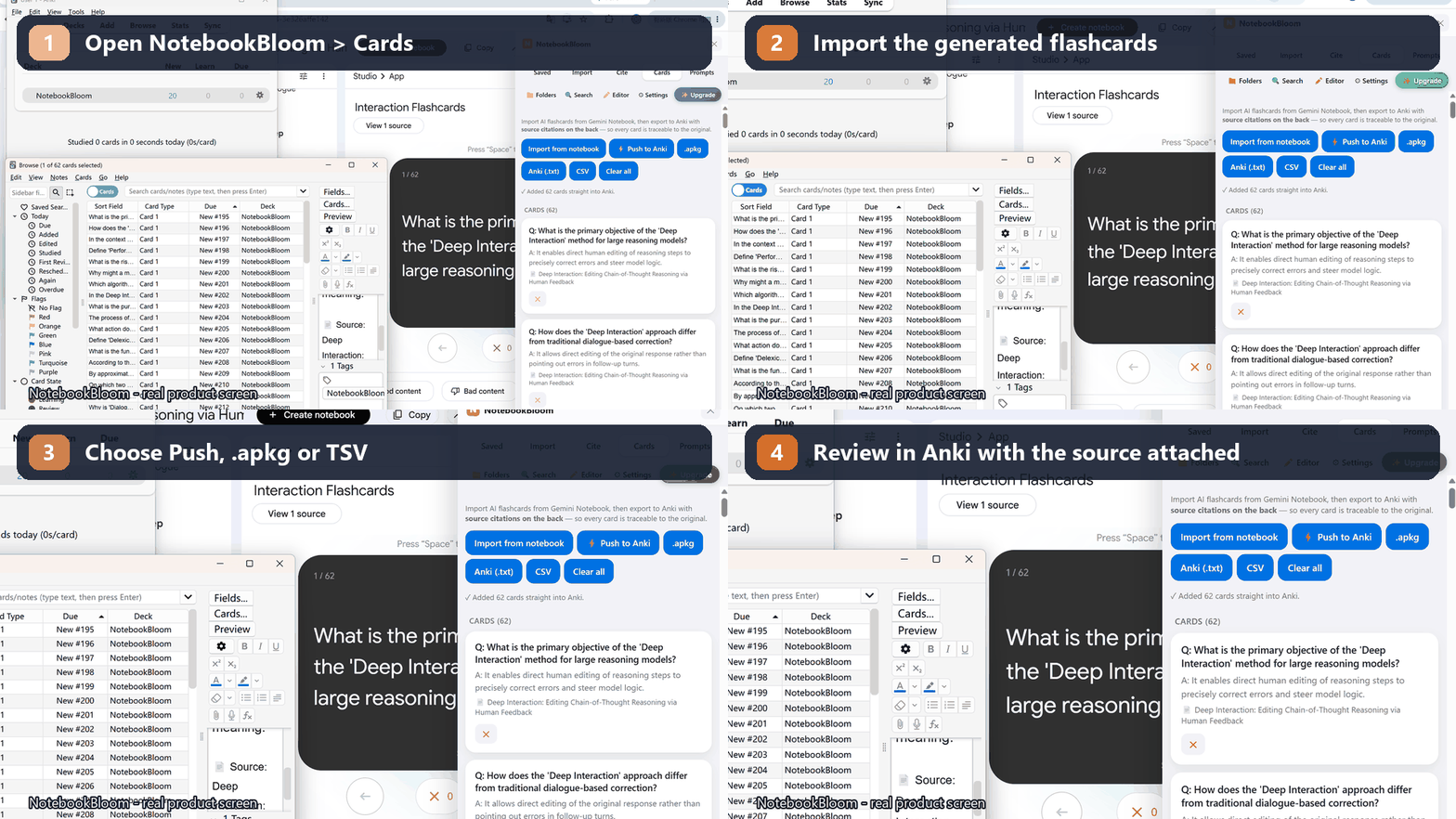
Every card carries the source on the back, and there's a cleanup pass that fixes the small formatting junk (stray markdown, broken math) that otherwise makes cards ugly in Anki.
What to do when AnkiConnect says Anki is not detected
Direct push talks to Anki Desktop through AnkiConnect on your own computer. If it cannot connect, check these three things before trying again:
- Open the Anki desktop app and leave it running.
- In Anki, open Tools → Add-ons → Get Add-ons and install code
2055492159. - Restart Anki after installing the add-on, then return to NotebookLM and try Push to Anki again.
AnkiConnect listens locally at 127.0.0.1:8765. That address refers to your own computer; NotebookBloom is not uploading the cards to a remote Anki server. If direct push is still unavailable, export an .apkg file instead. It does not require AnkiConnect.
\frac{}{} soup.Still called NotebookLM, or Gemini Notebook now?
Both names point to the same app. Google renamed NotebookLM to Gemini Notebook in July 2026, but the flashcard feature, the sources, and this whole workflow are unchanged. Whether your browser tab says NotebookLM or Gemini Notebook, the export works the same way.
Spaced repetition only helps if the cards actually make it into your review pile. Get them into Anki, keep the source on the back, and let the algorithm do its job.
If you're studying across several notebooks, two companion workflows help: turning those same sources into real citations (APA/MLA/BibTeX) for write-ups, and searching across every notebook at once when you can't remember which one a fact lives in.
FAQ
Can you export NotebookLM flashcards to Anki?
Not natively — NotebookLM (now Gemini Notebook) generates flashcards but has no export button, no .apkg and no CSV. NotebookBloom exports them to Anki as .apkg, TSV, or directly via AnkiConnect, with the original source printed on the back of every card.
In what formats can I export NotebookLM flashcards?
With NotebookBloom: .apkg (a ready-made Anki deck you double-click to import), TSV (tab-separated Front/Back/Source you can edit first), or a direct push into a running Anki via AnkiConnect.
Why does Push to Anki say Anki is not detected?
Direct push requires the Anki desktop app to be open and the AnkiConnect add-on (code 2055492159) to be installed. Restart Anki after installing the add-on. If the local connection is still unavailable, export an .apkg file instead; .apkg does not require AnkiConnect.
Does each card keep its source?
Yes. Every exported card carries the original NotebookLM source on the back, so you can verify where a fact came from — which matters when you're reviewing hundreds of cards before an exam.
Can NotebookBloom export a NotebookLM quiz to Anki?
No. NotebookBloom exports NotebookLM's flashcards, not its quizzes — the quiz feature isn't supported. If you want quiz-style review, generate flashcards from the same sources instead and export those.
Will math and formulas survive the export?
Yes, if Anki has MathJax enabled (it is by default in recent versions). NotebookBloom also runs a cleanup pass that fixes stray markdown and broken formatting so cards render cleanly.
Anki vs NotebookLM: which should I use for flashcards?
Use NotebookLM to generate cards from your sources and Anki to schedule long-term review with spaced repetition. They solve different parts of the workflow: NotebookLM creates and explains; Anki handles daily review, intervals and retention.
Official references
Product behavior can change. These official pages are the reference points used for this guide.
NotebookBloom is an independent extension and is not affiliated with Google. NotebookLM and Gemini Notebook are names for the same Google product; NotebookLM is a trademark of Google LLC.